 Zal Interactive
Flexbox
com.zalinteractive.flexbox
Resize a working settings screen
Flexbox needs Unity 6000.0.82f1 or newer in the 6000.0 line and uGUI 2.0.0. The runtime package has no dependency on Zal UI, Autofac, or DOTween. Newer Unity releases and device platforms need their own qualification.
The optional Settings List sample uses Input System and TMP Essential Resources. It runs without Zal UI or Autofac. Its prefabs reference the standard LiberationSans SDF font. The imported scene is Assets/Samples/Flexbox/0.1.0/Settings List/SettingsList.unity. Its bootstrap creates a Canvas and opens the settings view from the sample prefabs; it does not require a scene-authored window instance.
In the running sample, click Expand details to wrap the first description. Click Change width to resize the list. Measure 500 boxes records 60 warmup frames followed by 240 changed-layout samples and writes a report to Unity’s temporary cache directory.
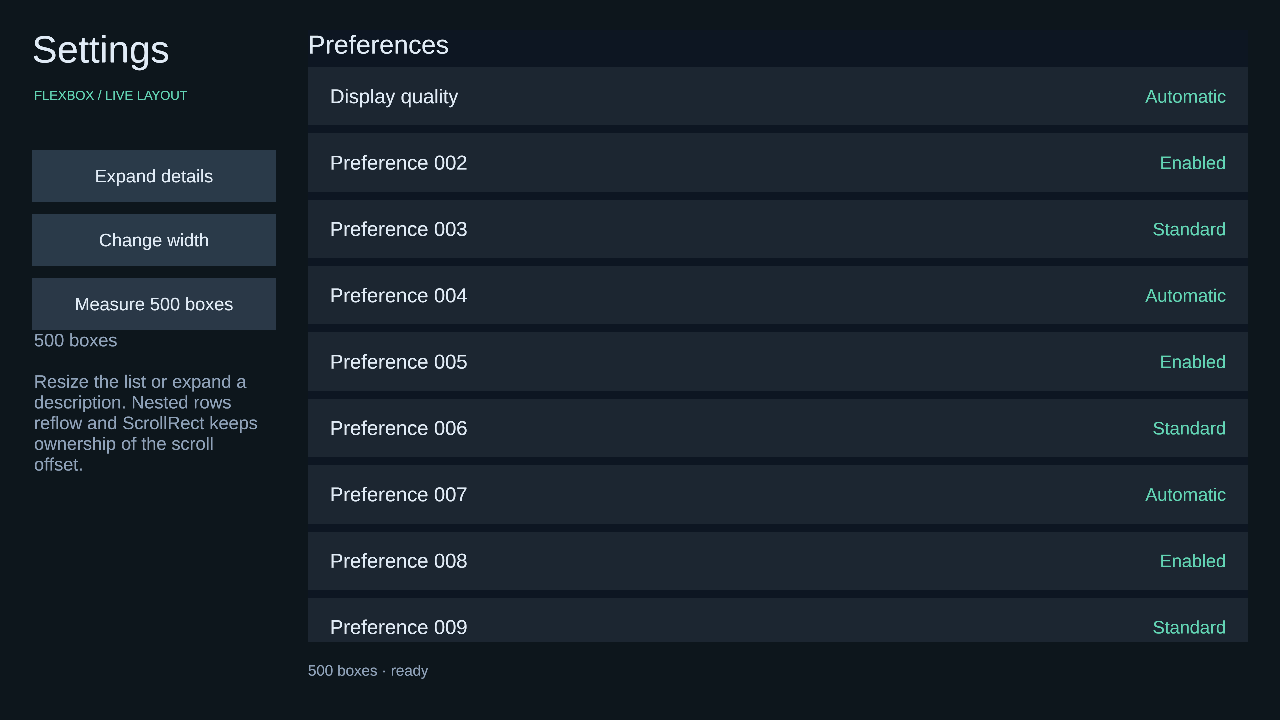
Figure 1
The first row becomes taller when its description wraps. Later rows move down, and the existing ScrollRect keeps ownership of the scroll offset. A clean root does not solve or measure again.
Give a panel two layout boxes
Use a RectTransform panel under your existing Canvas. Its parent continues to own the panel’s viewport. A FlexLayoutRoot owns registered descendants; a FlexBox describes one box. This setup belongs in your existing UI factory or view initialization:
using UnityEngine;
using UnityEngine.UI;
using Zal.Flexbox;

void CreateBoxes(RectTransform panel)
{
    panel.gameObject.AddComponent<FlexLayoutRoot>();
    for (var i = 0; i < 2; i++)
    {
        var item = new GameObject("Box " + i,
            typeof(RectTransform), typeof(Image), typeof(FlexBox));
        item.transform.SetParent(panel, false);
        item.GetComponent<Image>().color = i == 0
            ? Color.cyan : Color.yellow;
        var box = item.GetComponent<FlexBox>();
        box.SetWidth(200f);
        box.SetHeight(60f);
    }
}
The default block formatting stacks the two 200-by-60 boxes vertically. Layout runs at the Canvas update; use FlushLayout only when your code needs geometry sooner. Production code should inspect the typed results returned by setters and barriers.
Registered parents must also be FlexBoxes, except for the root and the dedicated FlexPresentation wrapper. Decorations may remain unregistered children. A nested FlexLayoutRoot starts a separate ownership boundary.
Keep LayoutGroup, ContentSizeFitter, AspectRatioFitter, and competing driven transforms outside this controlled subtree. Flexbox rejects conflicting ownership and retains the last published generation as stale.
Choose sizes and content roles
The Size and content Inspector group contains width, height, minimums, maximums, box sizing, and aspect ratio. Auto uses content or the formatting algorithm. A numeric float in code means root-local pixels: LayoutLength width = 320f;.
Pixels are local layout units before Canvas scaling. A world-space Canvas can therefore use fractional local values. Percent sizes resolve against the applicable containing width or definite height. An indefinite percentage size follows its automatic sizing rule. Minimum constraints win when a maximum is smaller.
Content Box sizes exclude padding and border. A width of 100 with 20 padding and 2 border on each side has a border width of 144. Border Box includes those insets. Border thickness affects geometry; your Graphic supplies its visible appearance.
The Box edges group uses left, top, right, bottom pixel values. Padding, border, gaps, sizes, and flex factors reject negative or nonfinite values. Margins and positioning offsets may be negative. Auto-margin toggles absorb available space in Flexbox and Grid. Length Overrides replaces individual edge or gap pixel fields with typed values. Percentage margin and padding use the containing width, including top and bottom edges. Percentage column gap uses the container content width; row gap uses its definite content height. Indefinite percentage gaps contribute zero in this profile. Border widths remain pixel values.
Automatic content measures a supported specialized adapter such as TMP. Decoration contributes no intrinsic size. Content also reads a generic ILayoutElement’s preferred size. Unknown graphics receive their authored rectangle; provide an IFlexContentFactory when their natural size needs an explicit adapter.
TMP stays one external box even when it wraps internally. The adapter observes supported text and typography changes, caches exact measurement constraints, and uses TMP’s shaping and wrapping. Custom content without a dirty callback must call NotifyContentChanged.
Arrange rows, columns, and tracks
A Flexbox container distributes free space along Direction, with optional wrapping, ordering, gaps, auto margins, and alignment. Basis supplies the starting main size; Auto uses the item’s size or content. Grow shares positive space and Shrink removes space in proportion to the base size. Explicit minimums can prevent shrinking.
For three 50-pixel bases in a 300-pixel row, grow values 1, 2, and 0 produce widths 100, 150, and 50 when minimums do not intervene. Reverse direction changes placement while preserving source order. Unity sibling order continues to control painting and raycast precedence.
Grid uses fixed lengths, fractions, automatic tracks, and min/max tracks. Explicit starts are one-based; zero requests automatic placement. Spans default to one. Auto Flow supports row, column, and dense placement. Implicit tracks grow storage automatically.
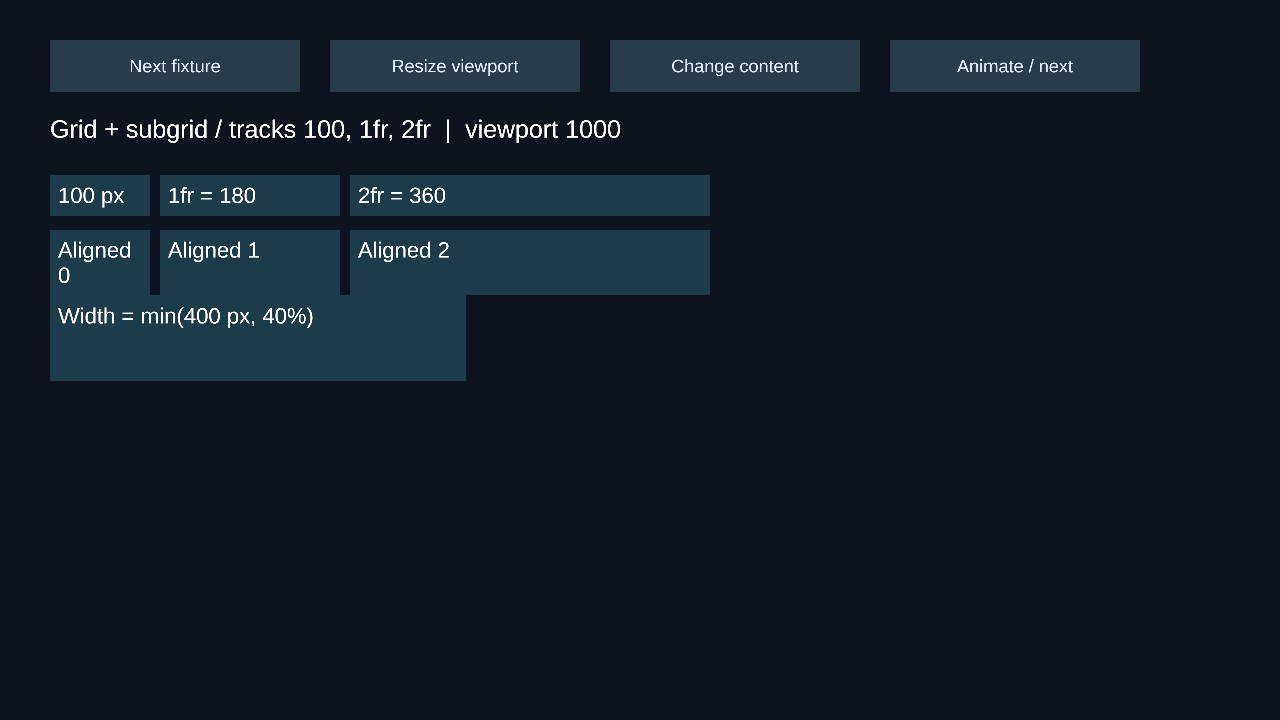
Figure 2
A 660-pixel Grid with two 10-pixel gaps and tracks 100, 1fr, 2fr resolves to 100, 180, 360. Subgrid inherits the tracks it spans and contributes nested intrinsic sizes and edge insets to its parent. Subgrid requires a direct Grid parent.
Flow around boxes and size tables
Block flow supports adjacent and parent/child margin collapse. Flow Root contains floats and prevents parent/child margin collapse. Floats exclude rectangular space for sibling boxes; Clear moves a following box beneath the chosen float sides.
Inline formatting wraps atomic child boxes and aligns their first baselines. TMP can wrap inside its own box, but the layout engine never distributes a label’s characters among neighboring inline boxes. This is a box-based Unity adaptation, not browser inline typography.
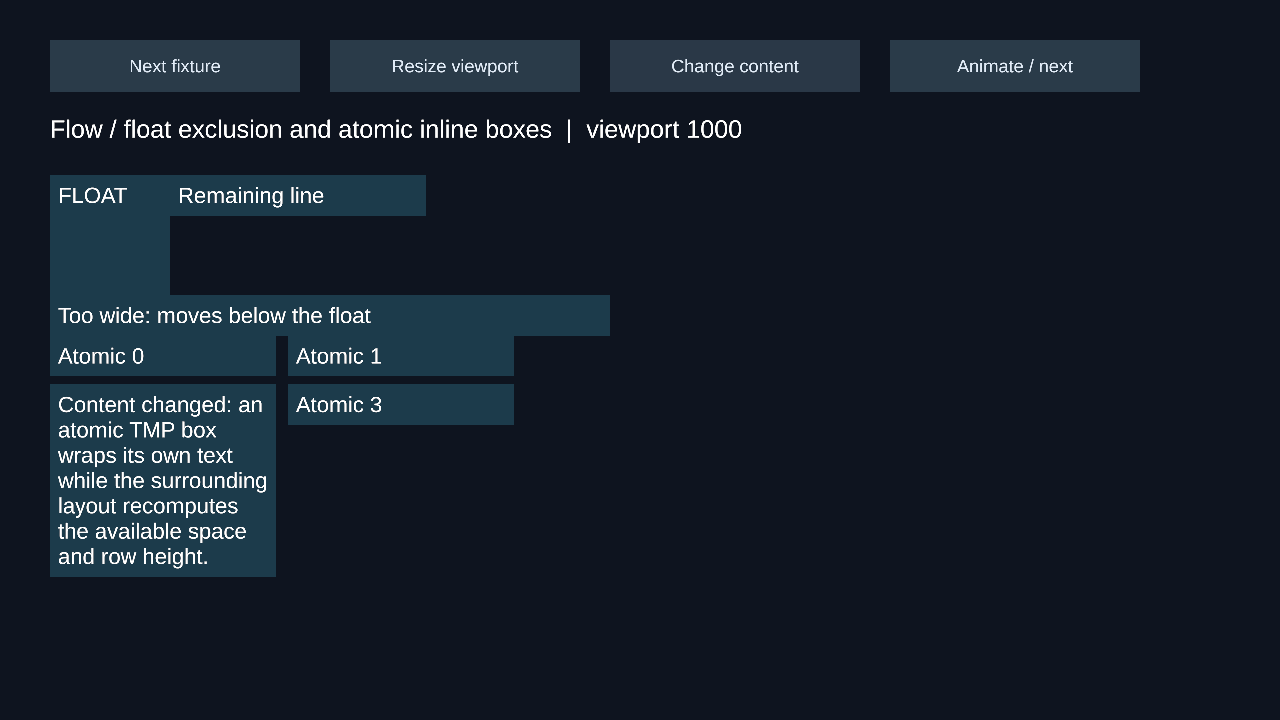
Figure 3
A table hierarchy uses Table > Table Row > Table Cell. Cells support column spans and row spans. Automatic tables collect minimum and preferred contributions; fixed tables use explicit tracks and first-row cell widths, including percentages, then share the remainder.
Place TMP in a child box inside a Table Cell when table baseline or vertical alignment should move its content. The cell rectangle stays the row’s resolved height; the text child supplies its own measured baseline. Pixel gaps separate rows and columns. This profile uses separate box borders and does not implement collapsed browser table borders or anonymous HTML table repair.
Keep scrolling and positioned content separate
The Positioning group provides relative, absolute, fixed, and sticky modes. Relative offsets retain the normal-flow slot. Absolute boxes leave normal flow and use the nearest positioned ancestor, or the root. Fixed boxes use the root viewport. Sticky boxes clamp against the scrollport and their containing bounds.
A scroll hierarchy has a ScrollRect outside the layout-owned nodes, a viewport with FlexLayoutRoot and RectMask2D, and a content child with FlexBox and FlexScrollContent. The adapter’s ScrollRect reference points to that outer ScrollRect. Its content reference points back to the content child.
Flexbox writes content extent; ScrollRect writes its anchored position. AutoHideAndExpandViewport scrollbar negotiation may change wrapping and trigger another solve before publication. Place separate scrolling regions under separate layout roots.
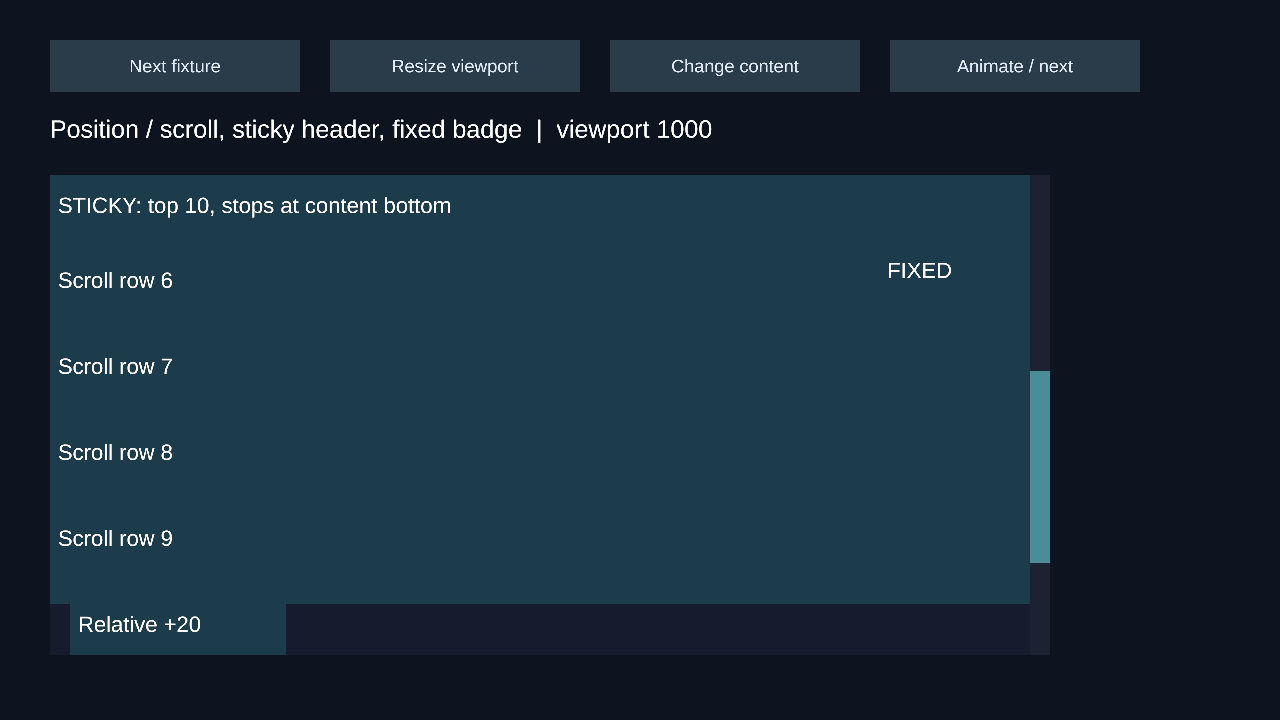
Figure 4
Masks, graphics, and raycasts remain Unity responsibilities. Keep clipping on the viewport. Flex order does not reorder Unity siblings: the sticky fixture puts its header last in paint order and first in layout order. Flexbox preserves each box’s authored pivot, so scale and rotation use that pivot without changing computed layout rectangles. A centered pivot keeps direct button scaling centered.
Balance content across columns
Columns divide the available width into equal tracks. A 620-pixel container with three columns and two 10-pixel gaps gives each column 200 pixels. Balance finds a shared height; definite-height filling moves later atomic boxes into subsequent columns.
Break Before, Break After, and Keep With Next control breaks between boxes. A box too tall for a column remains intact and overflows. One TMP component or interactive control is never cloned or split.
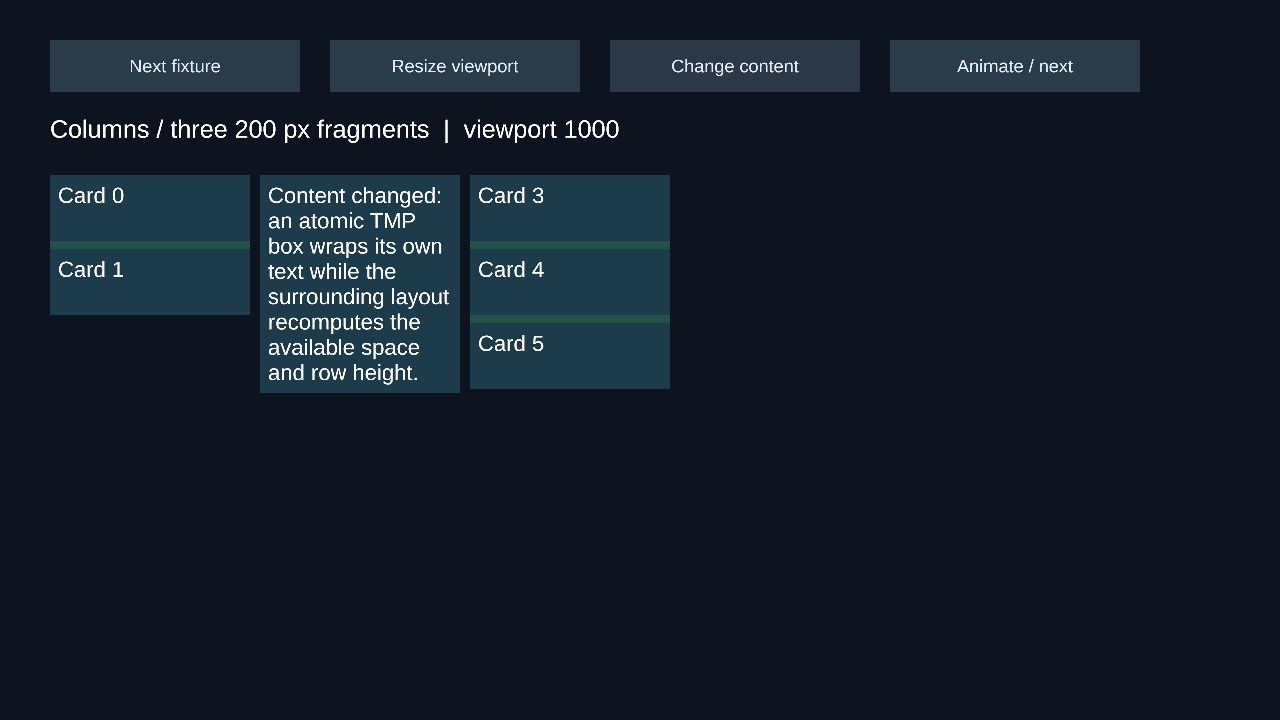
Figure 5
A content-free container can be Fragmentable. Its eligible descendants produce multiple published fragments with a stable renderer owner. FlexFragmentBackground draws those fragment rectangles through one non-interactive Graphic. Ordinary Image, TMP, and control components do not gain automatic fragment rendering.
GetPublishedFragmentCount and GetPublishedFragment read the previous committed fragments without solving. Inspect each result’s stale flag. A failed solve retains the previous fragment publication. Masks and ordinary Graphics on a fragmented owner are rejected. Keep masks on an enclosing viewport and use FlexFragmentBackground for the owner decoration.
Replace sizing values without parsing strings
Structured expressions contain pixel or percentage literals, addition, subtraction, scaling, division, min, max, and clamp. Operands refer to earlier zero-based instructions; the last instruction supplies a sizing value. The final receiving property validates the result. Division by zero and invalid references fail explicitly.
min(400 pixels, 40 percent) resolves to 200 in a 500-pixel containing width and 400 in a 1,400-pixel width. No CSS text is parsed.
Responsive rules compare viewport or nearest contained-ancestor dimensions. Minimum is inclusive; an optional maximum is exclusive. Matching rules replace a size, column count, Flex direction, or display mode. Later matching rules win. Inline Size containment suppresses descendant intrinsic width contributions; Size also suppresses descendant height contributions.
The six size inputs accept typed sources through BindValue. A source supplies Revision, a main-thread Changed event, and Read(in ValueSourceContext). A successful value is reused while source identity, revision, and viewport remain unchanged. Source notifications invalidate the bound box and its dependent ancestors.
var error = root.BindValue(box, LayoutProperty.Width, source);
if (error.HasValue) Debug.LogError(error.Value);
// The source increments Revision, then raises Changed.
Precedence is animation, responsive replacement, attached source, authored value. Releasing an override reveals the current lower-priority value. Cycles and source failures return typed errors. Other catalog properties retain their structured Inspector authoring; they do not accept arbitrary source bindings.
Read geometry and handle failures
GetComputedBox resolves pending layout before returning. It returns an error on failure or re-entry, not an old rectangle as success. GetPublishedBox never solves and returns the last generation with IsStale.
box.SetWidth(320f);
var current = root.GetComputedBox((RectTransform)box.transform);
if (current.IsSuccess)
{
    var width = current.Value.Border.Width;
    var generation = current.Value.Generation;
}
else Debug.LogError(current.Error);

var previous = root.GetPublishedBox((RectTransform)box.transform);
if (previous.IsSuccess && previous.Value.IsStale)
    Debug.Log("The published rectangle is awaiting a valid solve.");
Computed border, padding, content, and overflow rectangles use root-local coordinates, positive right and down. Overflow is geometry information; a Unity mask decides what is visible.
FlushLayout is an explicit geometry barrier. FlushVisuals additionally requests supported TMP meshes and Unity’s global Canvas barrier; it reports the visual-completion contract separately. A box query alone does not promise current character meshes.
MeasureInactive(in LayoutEnvironment) measures an inactive hierarchy with an explicit viewport without activating it or writing transforms. Its returned snapshot may allocate because it outlives the measurement. Inactive TMP is resampled because Unity suppresses its ordinary dirty callbacks.
Errors distinguish invalid values, missing nodes, stale handles, ownership conflicts, unsupported capabilities, source cycles, re-entry, and commit failures. Fix the input or writer conflict and notify the root through the supported setter or NotifyContentChanged. The previous publication remains available as stale until a successful commit.
Choose what an animation changes
FlexReflow animates one sizing input. Every sampled value can move siblings and change wrapping. Its endpoints must use matching pixel or percent units. Completion retains the destination override; Cancel releases it. Animation tokens survive internal storage growth and are invalidated when the root disables.
FlexLayoutTransition animates a dedicated FlexPresentation wrapper. The wrapper stretches across its parent FlexBox, has a centered pivot, and contains the graphics and optional child boxes. It carries no Graphic or FlexBox itself. Capture the current visual rectangle before changing layout; Play solves the destination and animates the wrapper to it.
var capture = transition.Capture();
if (capture.HasValue) return;
box.SetWidth(440f);
var playback = transition.Play(0.25f);
if (playback.HasValue) Debug.LogError(playback.Value);
FlexFade changes a CanvasGroup’s opacity using unscaled time. It does not read layout inputs, measure text, or solve geometry. A fade leaves raycast and interactable settings under your control.
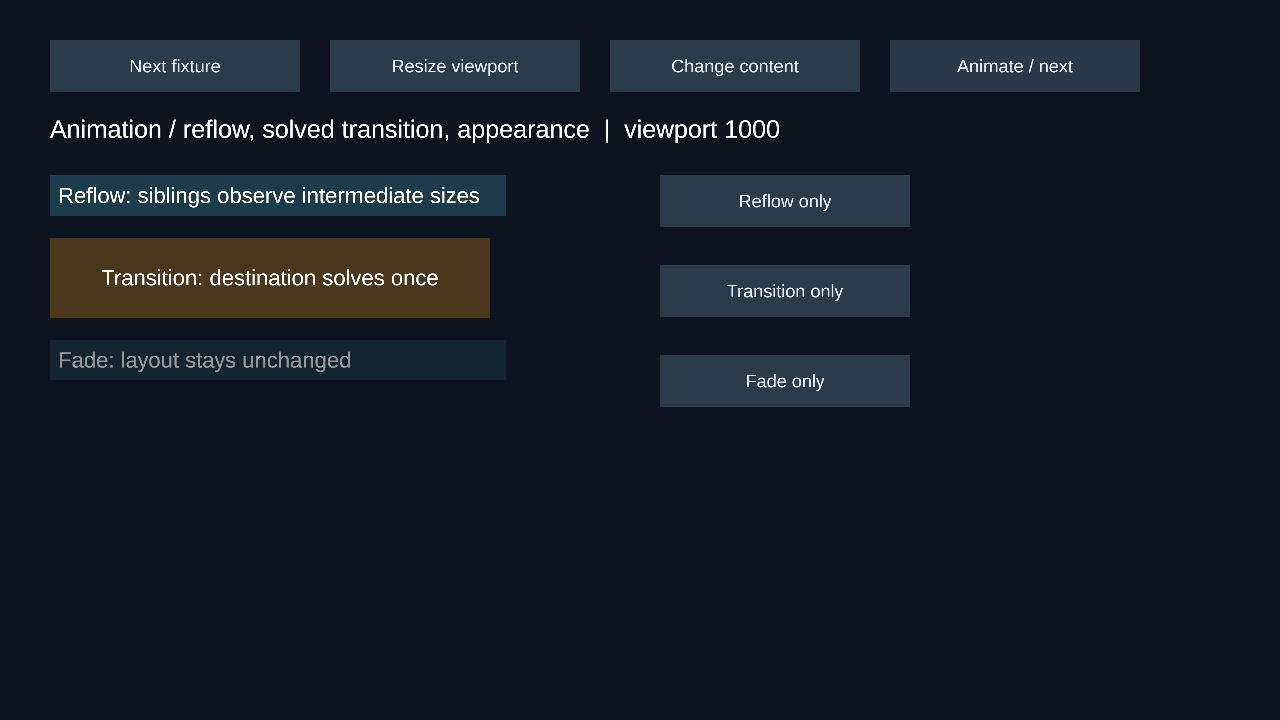
Figure 6
The optional DOTween Bridge sample drives the same token contract. It requires a consumer-provided DOTween assembly and has not been qualified in this project’s dependency set. Importing it is optional; removing it does not affect Core, Runtime, TMP, or Animation.
Understand the measured configuration
The package uses engine-free C# algorithms with Unity adapters and no native plugin, runtime code generation, or reflection into Unity internals. Its portable runtime path targets mobile, Web, PC, and console. Platform support and measured qualification are different claims.
Qualification performed here uses Unity 6000.0.82f1, uGUI 2.0.0, macOS 27.0, Apple M1 Pro, and a Development Mono Player. Overlay, camera, world-space, and nested-Canvas fixtures were exercised in the Editor. Newer Unity, Android, WebGL, Windows, iOS devices, consoles, and XR remain unverified where modules or devices are unavailable. The macOS IL2CPP module is also unavailable.
The 500-box settings workload changes one label after 60 warmup frames and records 240 dirty updates. Internal storage grows to its high-water demand automatically. No reserve size, seal step, or capacity limit is exposed to users. Growth allocations are permitted; later stable work reuses the storage.
A validated thread-scoped GC.Alloc event recorder reported zero allocation events inside warmed layout calls. This does not mean every Canvas frame or arbitrary third-party content adapter allocates nothing. TMP timing and overall layout timing are recorded separately. On this Mac at 3456 × 2168, layout measured 1.363 ms median / 1.784 ms p95, including TMP measurement. Subtracting the paired TMP measurement sample gave 0.889 ms median / 1.183 ms p95 for framework work. The overall 1 ms target remains unmet. These are Development Mono Player measurements, not Editor timings or promises for other hardware.
The selected box-layout profile adapts CSS concepts to atomic Unity components. Browser parsing, cascade, selectors, HTML, browser text shaping, writing directions, visual effects, printing, generated text, and automatic TMP/control splitting are excluded. Indefinite percentage gaps, Unity paint order, rectangular float contexts, and separate table borders are explicit adaptations. The profile does not claim complete browser CSS conformance.
When geometry looks wrong, first check the root’s viewport, conflicting Unity layout writers, content role, definite percentage basis, and supported hierarchy. Preserve the returned LayoutError and the last published generation when reporting a reproducible issue.